This content is protected
To view, please enter the password.
EasyPermit
Date
2020 - 2022
Client
EasyPermit Corp.
Sector
Public permits (GovTech)
Role
Lead UX/UI Product Designer
Team
Alejandro Bergues, Founder & Technical Lead
Jorge Dominguez, Founder & Business Lead
Daniel Iglesias, Full Stack Developer
Overview
In late 2020 the founders of EasyPermit asked me to join their pitch team. For years they had helped people get building permits in US cities face to face, and now they wanted an app that connected permit runners with the cities. As we researched, a bigger problem came up: public permit information was hard to reach, and sometimes it did not exist at all. So the idea grew into one place to find any permit fast and hear from the city the moment something changed.
The challenge
The pilots had worked, but they depended on people. The app had to onboard users on its own and keep everything about a permit (status, alerts, documents and history) in one place, both for people who knew the process inside out and for people facing it for the first time. We summed it up in three words that guided the whole project: fast, clear and accessible.
My role
From November 2020 to March 2022 I led the experience strategy and the design of the iOS app and the web platform, from the brand to the last screen. I worked side by side with the two founders and our full stack developer, and with a junior UX architect who took on the Android app.
The result first
Before the process, this is where it ended up: the video that presented EasyPermit when it reached the stores. The rest of this page tells how I got there, step by step.
Five archetypes, two to start with
Everything started with the people. Research made it clear that a permit meant something different to each of them, so I segmented users by how well they knew the process, how often they needed a permit and why. That gave us five archetypes. Together with the founders I chose two for the first release: Mary, a fast-paced buyer who hates the paperwork, and Jhony, a permits runner juggling many clients at once. Natalie, the Ruiz family and Chris would come in later releases. Pick any of them below to see what they wanted, what got in their way and how they worked day to day.
- 32 / Female
- Miami, Florida
- Contracts Manager
- Single / No kids
- Streamline the permit application and approval process to cut waiting times.
- Keep a clear line with local authorities and regulators to solve issues and clarify requirements.
- Make sure every project complies with construction, safety and environmental standards.
- Permits get delayed by bureaucracy and unclear local processes.
- Regulations change often and she has to stay constantly up to date.
- Misunderstandings with local authorities have caused delays in the past.
- Devices
- iPhone 75%, MacBook 25%
- Apps
- Excel, Google Docs, Google Drive, DocuSign, Instagram
- 38 / Male
- Miami, Florida
- Permits Runner
- Married / 2 kids
- Manage the permit application and approval process effectively.
- Give local authorities and regulators the right documentation for each type of permit.
- Make sure every project complies with construction, safety and environmental standards.
- Unclear client requirements and poor communication lead to rework and delays.
- It is hard to balance what clients want with code and technical constraints.
- Juggling many projects at once scatters his focus and leaves little time for himself.
- Devices
- iPhone 60%, MacBook 40%
- Apps
- Excel, Google Docs, Google Drive, DocuSign
- 29 / Female
- Orlando, Florida
- Marketing Specialist
- Married / No kids
- Understand which permits her renovation needs before any work starts.
- Know where her permit stands without calling the city.
- Keep her contractor and the inspector aligned on dates.
- The process is full of jargon she does not understand.
- Information is scattered across city websites that contradict each other.
- She never knows if silence means progress or a problem.
- Devices
- iPhone 85%, Tablet 10%, MacBook 5%
- Apps
- Google, Pinterest, WhatsApp, Gmail
- 41 and 43
- Tampa, Florida
- Nurse and business owner
- Married / 3 kids
- Keep every permit of the build on schedule so the crew never stops.
- Share one up-to-date view of the project between the two of them.
- Keep contracts, plans and inspection reports in one place.
- One delayed permit can stop the whole build and raise costs.
- Documents end up split between two phones, email and paper.
- They hear about problems late, usually from the contractor.
- Devices
- iPhone 70%, Tablet 20%, MacBook 10%
- Apps
- WhatsApp, Excel, Google Drive, DocuSign, Gmail
- 45 / Male
- Doral, Florida
- Permit Coordinator, City Hall
- Married / 1 kid
- Cut the calls and visits that only ask for a permit's status.
- Reach residents and contractors in real time when something changes.
- Give clear, consistent information about requirements.
- The same questions arrive by phone, email and in person all day long.
- Residents bring incomplete documents because the rules are hard to find.
- Legacy systems make it hard to share a permit's status outside the office.
- Devices
- iPhone 30%, Tablet 10%, MacBook 60%
- Apps
- Outlook, Excel, Accela, Teams, DocuSign
One map for the whole app
With Mary and Jhony in mind, the founders signed off the scope of the first release, and I turned it into a single map of the app using Jesse James Garrett’s visual vocabulary. I numbered every screen from day one, so design and development always talked about the same thing. Tap any screen below to read the note I left for the team.

A brand built from three ideas
While the structure took shape, the founders asked me for one more thing: the brand. It was a rare chance to design a product end to end, from the logo to the last screen. I joined the three ideas behind the business (easy, permit and map search) into a single mark, a map pin that also reads as a speech bubble with an e. Below, the mark is built on its construction grid.
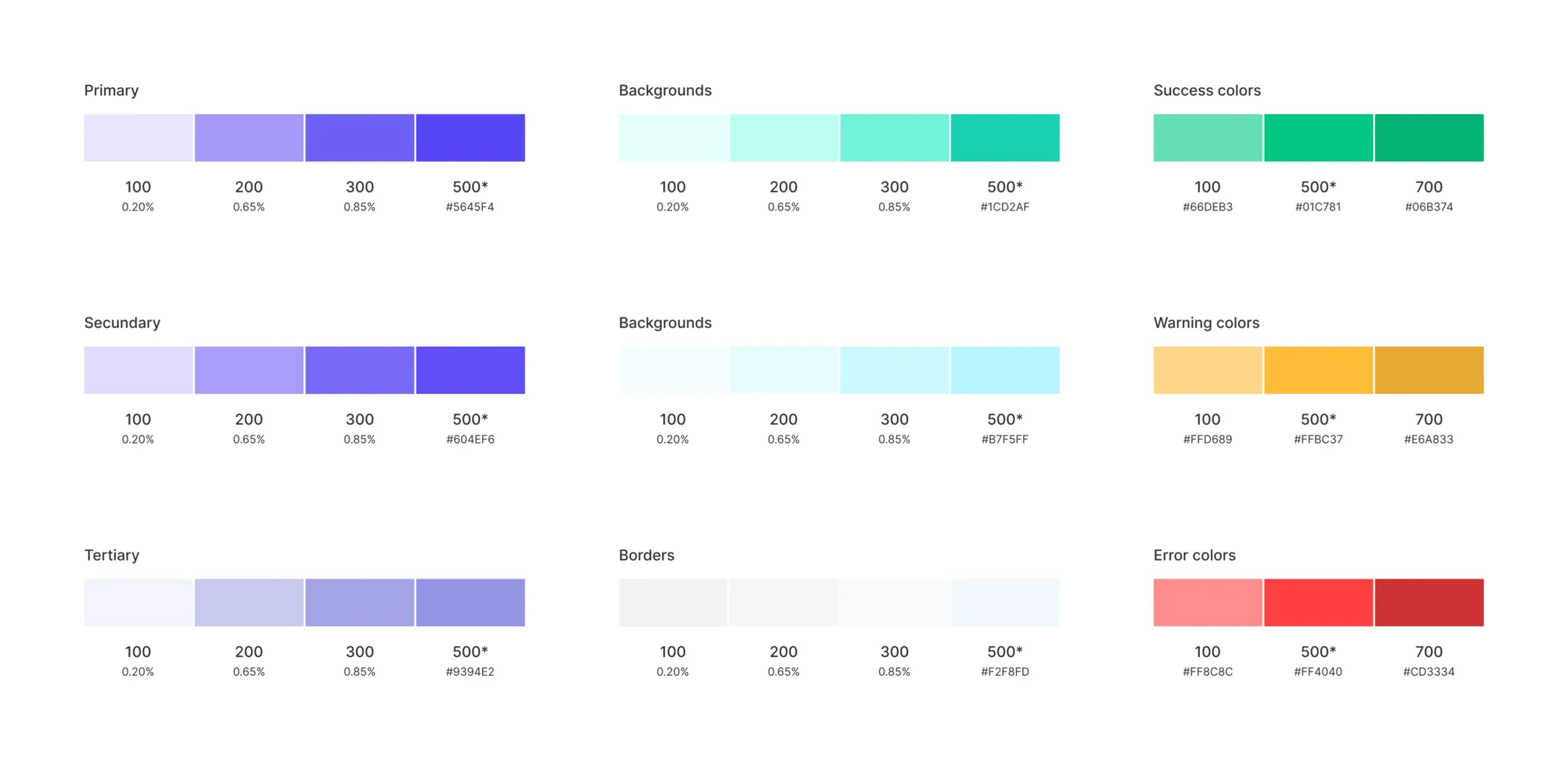
From the mark I built the palette: a violet primary, fresh mint backgrounds and one clear colour for each permit status (approved, pending and cancelled), so anyone could read a permit at a glance. For type I chose SF Pro, for its legibility on iOS.
From sketches to screens
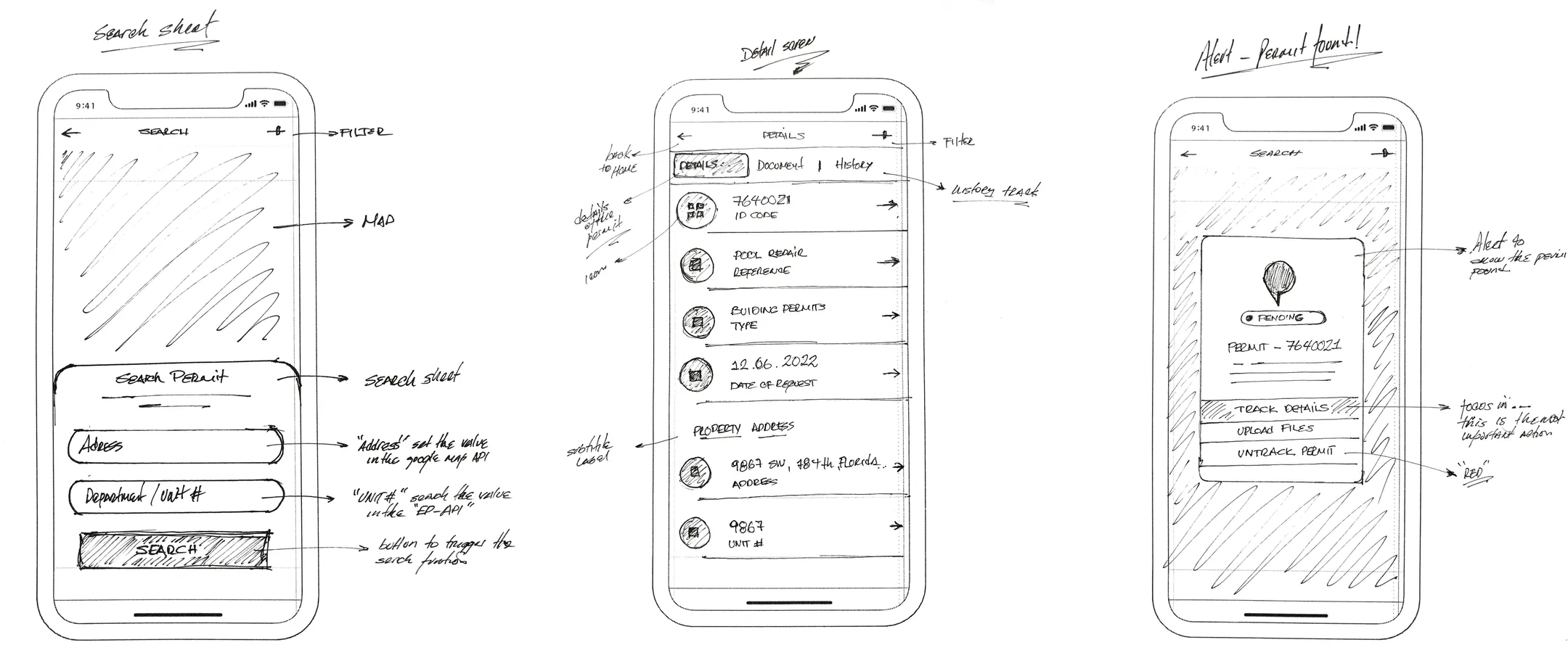
With the map and the brand in place, I went back to the screens and worked top down. Before opening Figma I sketched search, the permit detail and the alerts by hand, a quick way to test layouts with the team. Those sketches became wireframes, and the wireframes became the annotated home screen you see in the animation.
The final app
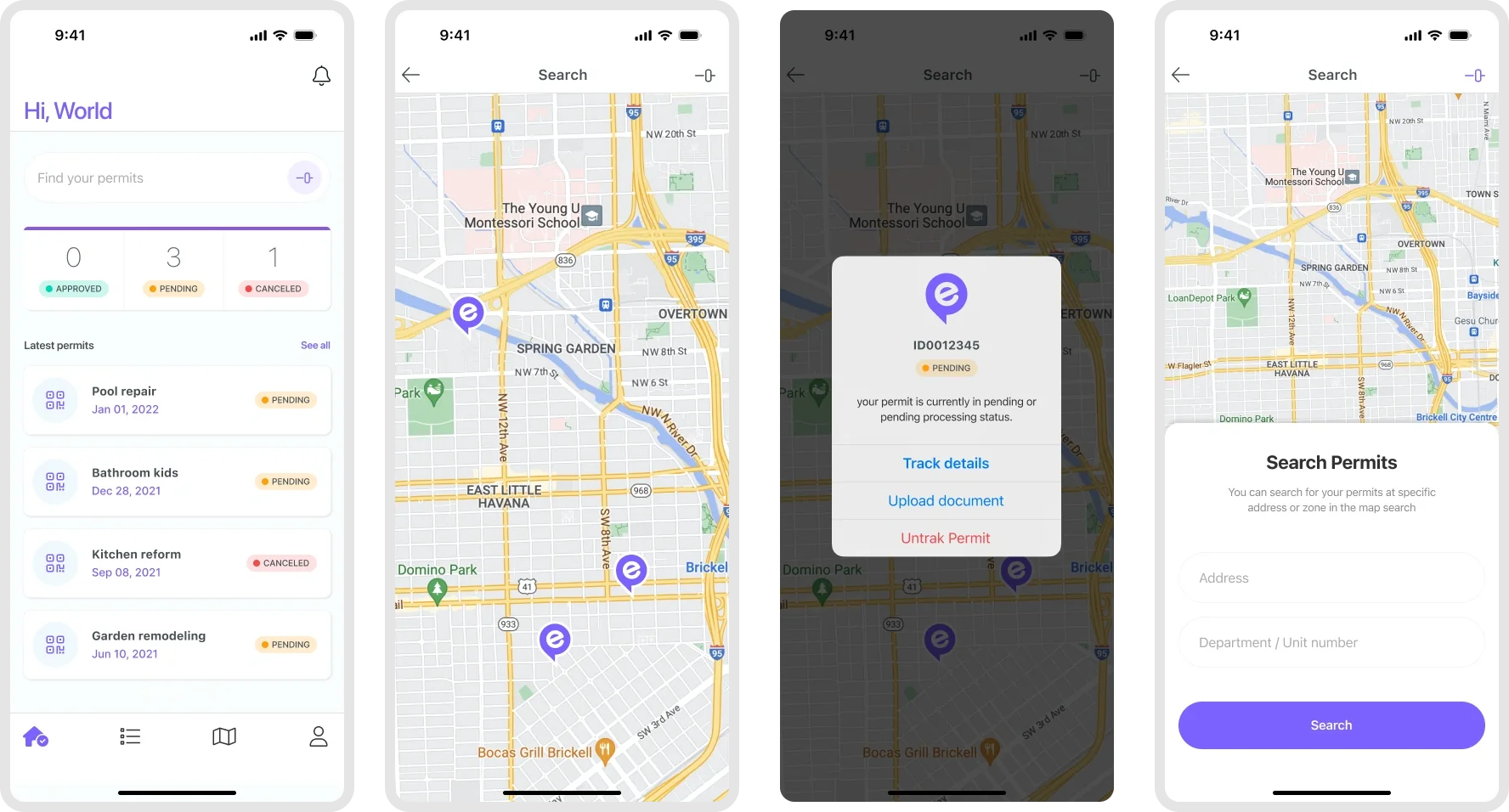
The home shows the status of every permit at a glance. From there people search on the map or by address, and the app alerts them as soon as the city changes something.
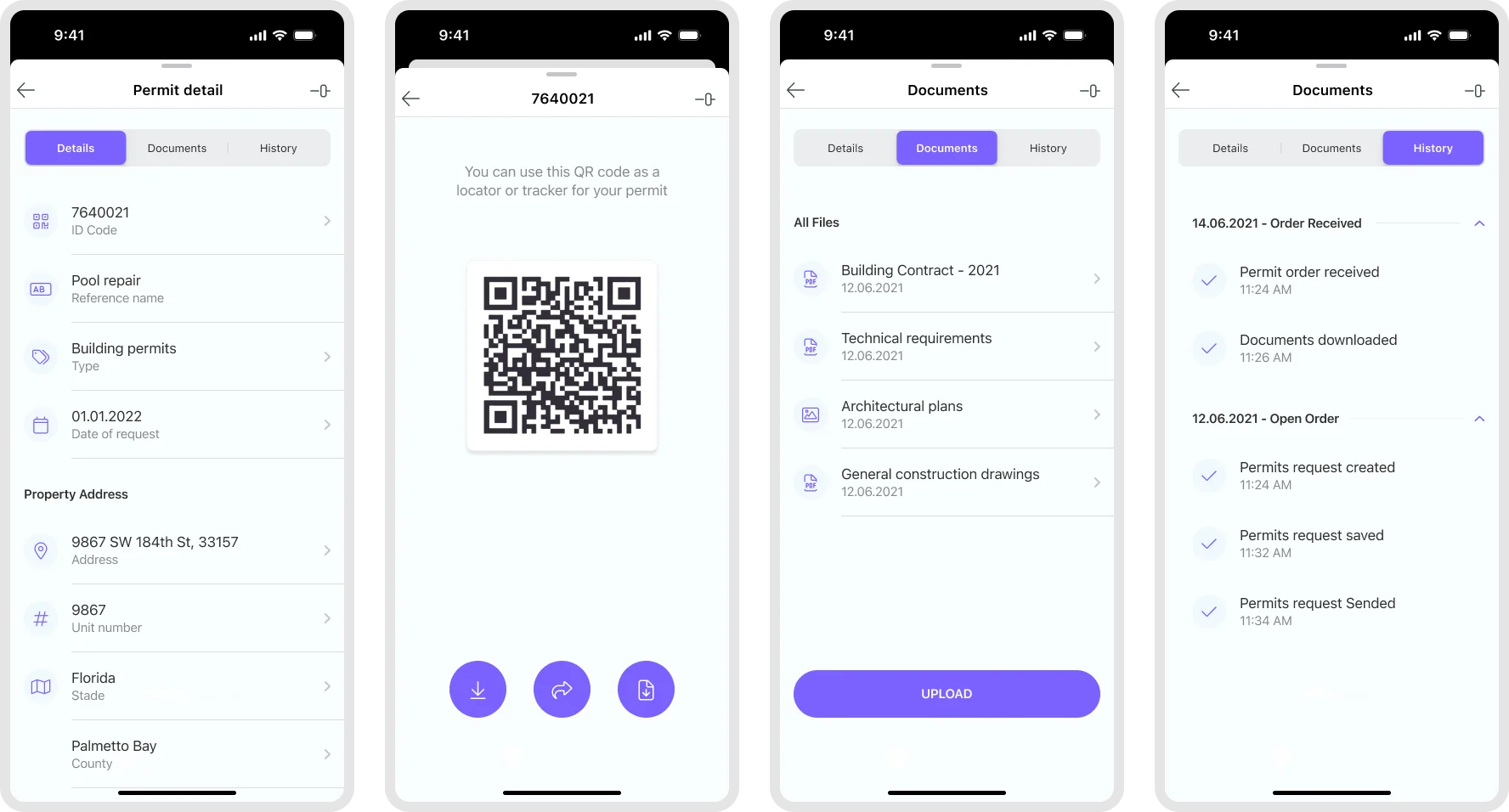
Each permit opens into a detail view with its documents, a QR code to share it and its full history, so nobody has to call the city to know where things stand.
The impact
In a few months we designed EasyPermit for iOS, Android and desktop, and every screen kept the promise we made at the start: fast, clear and accessible. The new identity made a young company feel modern and reliable and set it apart in its market. For me it was one of those rare projects where I could shape everything, from the first piece of research to the logo, and see it reach people’s phones.